
Sitemaps

I wanted the transition to the new website to go as smoothly as possible. In the past there were certain things you could do to help search engines categorize your page. There are simple things that are part of HTML like using a title tag, using header tags to identify important parts of the page, etc. But you can also add META tags. A description of the site is good, and the descriptions I used would usually show up in the search results under the title of my page. At the time it was good to include keywords, but those seem to be less important now and instead the search engines find their own keywords in the text of your page.

Looking into all of that again, I signed up for Google’s webmaster tools service (they had me verify that I owned my site by including a specially named file on my site). Google pointed me in the direction of using a special sitemap.xml file that would tell the search engines where all of my pages are located and how often they are updated. Though Google seems to have originated this, a lot of other search engines use it too. A lot of websites have an html sitemap for visitors that shows all of the pages on their site, like a Table of Contents. But this file is xml and is intended just for the search engines. A piece of it might look like this:
Continue reading “Sitemaps”

Snow

This week has been a winter wonderland with two big snowfalls. Wednesday was fun at work as we anticipated the snow and watched its approach on radar. Once it started coming down there were giant fluffy flakes of snow. And in almost no time it started sticking to the grass and parked cars. A couple of people were talking about how silly it is when the news talks about bridges and overpasses icing over. Overpasses are bridges. The only time this distinction seems to be made is when referencing ice. And there just isn’t a distinction.

Continue reading “Snow”

Cinemania 96 Updates

I still use Cinemania ’96 to look up movies and tell me the difference between Panavision and Panascope. Microsoft stopped issuing new versions eventually and no one else has come up with anything quite as good. I can eke out a little more info by getting the updates and installing those, which gets me current through the summer of 1996.

You can get downloads from Microsoft’s FTP site (updates for other versions of Cinemania as well as Encarta are available there too by going up to parent directories and then back down):

ftp://ftp.microsoft.com/deskapps/mmapps/public/cinemania/Cinemania96/Windows

Download the executables, double-click to run them which will give you a bunch of .cin files. Rename them to give them the extension .cin96upd

Put them in the Program Files/Microsoft Multimedia/Cinemania folder. Then when you run Cinemania from CD again, it should see the files and incorporate them.

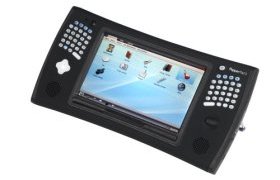
Pepper Pad

Prior to today’s Macworld keynote speech by Steve Jobs, there were rumors that Apple would announce an internet tablet device with a large touchscreen that would fill a gap between the iPhone and a notebook computer. What Jobs actually introduced was a very thin notebook computer for $1800.

In the days leading up to Macworld I looked up what else was out there. Several years ago Microsoft had introduced Tablet PC’s which were to be notebooks without the keyboard. But the idea of a true slate form has met resistance and instead what you have are sub-notebooks and notebooks that convert into a slate by rotating the screen and folding it on top of the keyboard. They’re expensive too, more than the average notebook. Later, Microsoft (again) introduced the Ultra Mobile PC or UMPC which was supposed to be a small slate like I am talking about. With Microsoft behind it, it was supposed to run Windows and have several other features. They have gone nowhere either, but a few companies make subnotebooks that are considered UMPC’s even though UMPC’s are supposed to be slates, without a keyboard.

pepperpad.jpg

Continue reading “Pepper Pad”

Redirects

One problem with changing web sites like I am doing is to make sure the search engines can still find you. The best way to do this is apparently to use an .htaccess file that will automatically re-route people (and search engine crawlers) to the new site. Another way (that apparently search engines don’t deal very well with) is to use redirect pages. I tried doing an .htaccess file at speedfactory, but it would just give me an error message. So instead I have installed a couple of redirects (with a one-second delay), but not on my main battery and dejumbler pages since those bring in the most revenue. I figure I can watch and see how long it takes Google to start referring to those files in their new location.

Also I did a global find and replace on the blog to at least get all of my past links to point to the new site. On my web pages that I am leaving at Speedfactory for now, the links to other pages point to iGirder pages instead of local versions. Maybe that way Google will see the links to iGirder and start to rank those pages.